from tkinter import *

t = 0


def set():
    global t
    t = t + int(entry.get())
    return t


def start():
    global t
    if t > 0:
        lbl.config(text=t)
        t = t - 1
        lbl.after(1000,start)
        return t
    elif t == 0:
        lbl.config(text="go")


root = Tk()

root.geometry("380x350")
root.config(bg="black")

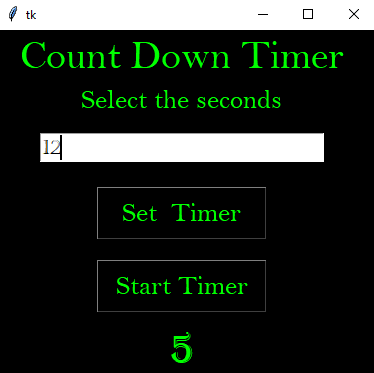
Label(root, text="Count Down Timer", font=("bell mt", 30),bg="black",fg="#00ff00").grid(row=0, column=0, padx=20)

Label(root,text="Select the seconds",font=("bell mt",20),bg="black",fg="#00ff00").grid(row=1,column=0,padx=20)

entry = Entry(root, font=("castellar", 15),fg="black")
entry.grid(row=2, column=0, padx=20,pady=15)

b1 = Button(root, text='Set  Timer', font=("bell mt", 20),bg="black",fg="#00ff00",width=10,height=1, command=set)
b1.grid(row=3, column=0, padx=20,pady=10)

b2 = Button(root, text='Start Timer', font=("bell mt", 20),bg="black",fg="#00ff00",width=10,height=1, command=start)
b2.grid(row=4, column=0, padx=20,pady=10)

lbl = Label(root, text="", font=("algerian", 30),fg="#00ff00",bg="black")
lbl.grid(row=5, column=0, padx=20)

root.mainloop()